View G-code layer by layer
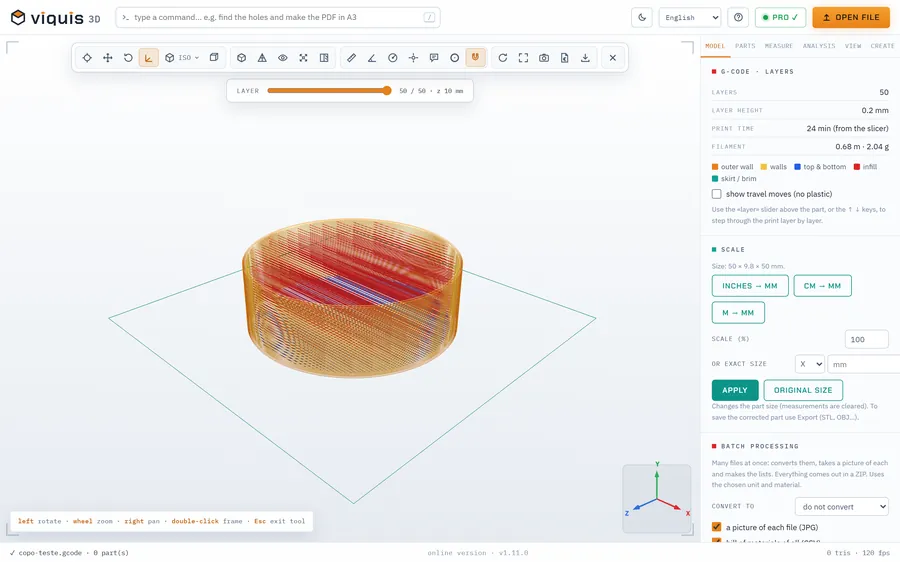
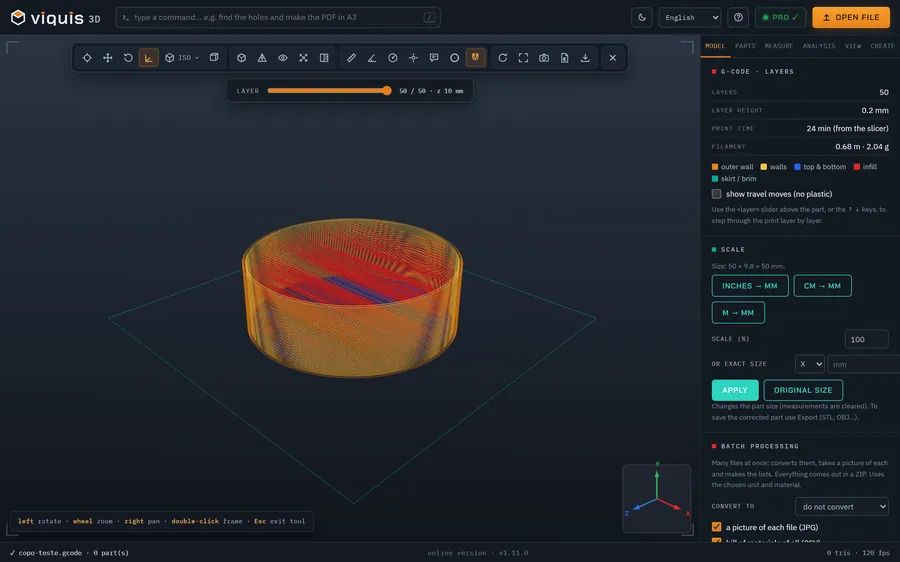
Check a G-code file before sending it to the printer: the layers, the supports, the time and the metres of filament.
Free
Free, no sign-up and no time limit. The file stays on your computer.
How it works
- 1
Click «Open a G-code file». The app opens in its own tab.
- 2
Drop the .gcode or .gco file onto the 3D area.
- 3
Use the layer slider or the ↑ ↓ arrows to step through the layers.
- 4
See the number of layers, the layer height, the time and the filament.
Why Viquis 3D
- Colours for outer wall, walls, top and bottom, infill, supports, bridges and skirt.
- Shows travel moves if you want.
- Reads the slicer's time; if it is missing, makes an estimate.
- Free, in your browser.
Questions
Which slicers' G-code does it read?
G-code for FDM printers, such as from Cura, PrusaSlicer, OrcaSlicer or Bambu Studio.
Is the time shown the real one?
If the file carries the slicer's time, that is what you see. Otherwise the app estimates it, usually on the low side.
Is it free?
Yes, with no time limit.
Try it now
The app opens in its own tab with a sample assembly. Drop your file on top of it.
Opens in its own tab. Free; Pro is activated inside the app with your key.
More tools
STEP viewer
Open STEP and STP files in your browser, see the assembly parts and measure.
See the tool FreeSTL viewer
View STL, 3MF and OBJ files in 3D and measure them, with nothing to install.
See the tool FreeFix scale and units
STL came in 25.4 times too small? Convert inches, cm or m to mm.
See the tool FreeLithophane maker
Turn a photo into a relief panel that shows up against the light.
See the tool